
Why You Shouldn’t Fear Noise in Photography
For years, photographers have been taught to avoid noise at all costs. We would keep our ISO as low as possible, sometimes sacrificing shutter speed or depth of field just to keep our images “clean.” While image quality is always important, today’s cameras and editing tools have changed the way we think about noise.
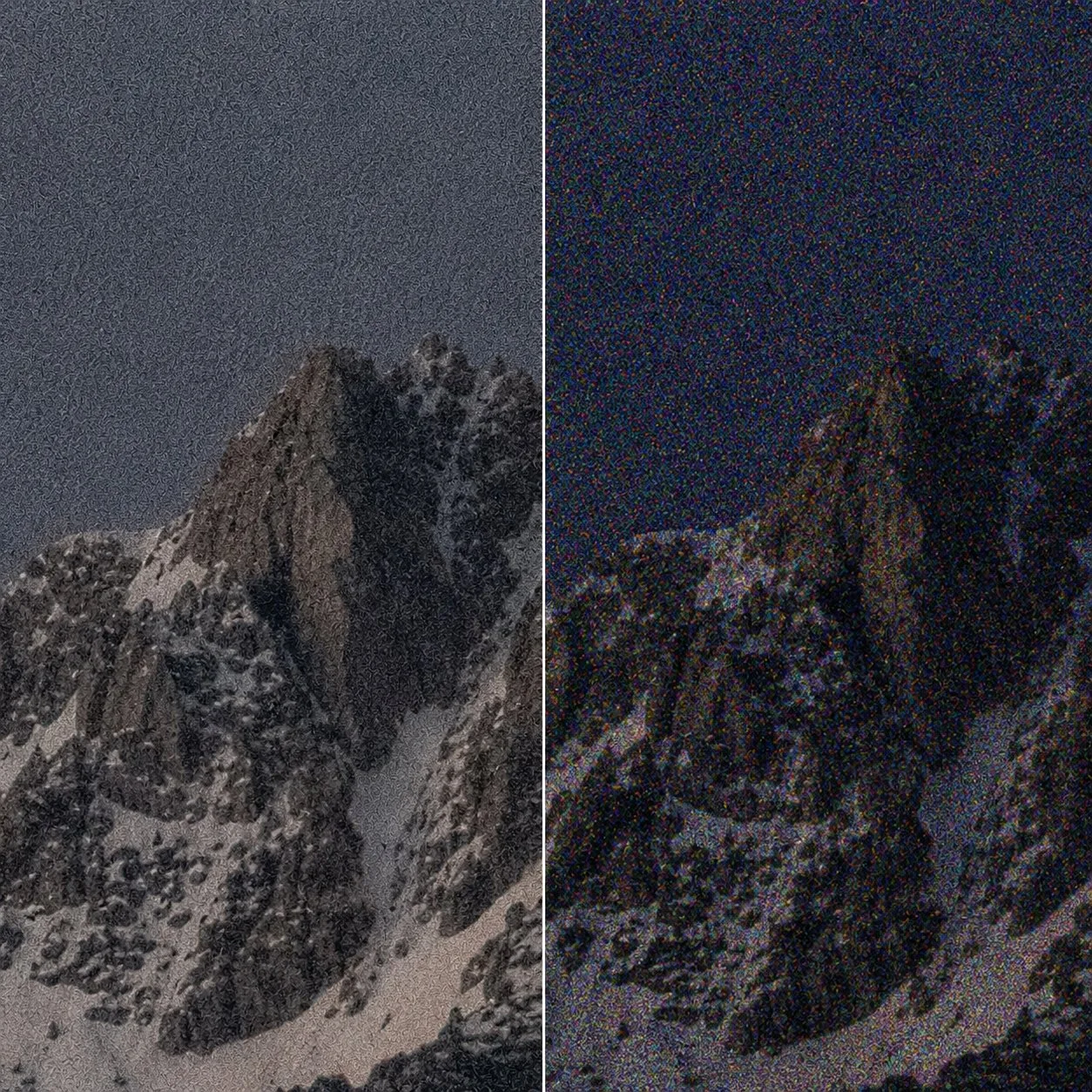
Luminance noise (left) appears as grain, while color noise (right) appears as random colored speckles.
What Is Noise?
Noise is the grainy or speckled appearance that can show up in a photograph, especially in darker areas or images taken at higher ISO settings. Instead of smooth colors and tones, you may notice tiny variations in brightness or color.
There are two main types of noise:
Luminance Noise: This looks like grain or texture in an image. It affects the brightness of pixels and is usually the type of noise photographers notice first.
Color Noise: This appears as random patches of unwanted color, often showing up as red, green, or blue speckles. Modern cameras and editing programs usually handle color noise very well.
What Causes Noise?
Noise is most commonly associated with high ISO, but ISO itself does not create noise. Noise becomes more noticeable when there is not enough light reaching the camera sensor.
Common causes include:
Low-light situations: Photographing wildlife at dawn or dusk, night skies, forests, or cloudy conditions often requires higher ISO settings.
Underexposed images: Brightening a dark photo in editing can reveal more noise.
Older cameras or smaller sensors: Modern camera sensors generally handle noise much better than older models.
Long exposures: Heat buildup during long exposures can sometimes introduce additional noise.
How Technology Has Changed the Way We Think About Noise
For many photographers, the fear of noise comes from years of experience with film or older digital cameras. In the past, higher ISO settings often came with a noticeable loss in image quality. High ISO film produced visible grain, and early digital cameras often created noise that could quickly affect the look of an image.
Today’s cameras have changed that. Modern sensors are much better at handling low light, and ISO settings that once seemed extreme are now commonly used by wildlife, sports, and night photographers. An image photographed at ISO 3200, 6400, or even higher can still contain incredible detail.
Why Higher ISO Is Not Always a Bad Thing
One of the biggest mistakes photographers make is being afraid to raise their ISO, especially when photographing wildlife. Animals rarely wait for perfect light. They are often most active early in the morning, late in the evening, in forests, or during cloudy conditions. Trying to keep your ISO too low can leave you with a shutter speed that isn't fast enough to freeze the action, resulting in motion blur.
A sharp image photographed at ISO 3200, 6400, or even higher often has much more potential than a blurry image taken at a lower ISO. The goal is not always the lowest ISO. The goal is to choose the settings that allow you to capture the moment.
Left: Original image at ISO 3200. Right: The same image after Lightroom AI Denoise. Click the image to enlarge and compare the details.
Left: Original image at ISO 1000. Right: Image after noise reduction and sharpening using Topaz Photo AI. Click the image to enlarge and compare the details.
Modern Noise Reduction Has Changed Everything
Editing technology has come a long way. Older noise reduction tools often removed detail along with the noise, leaving images looking overly smooth. Today’s advanced noise reduction tools, many powered by AI technology, are much better at recognizing the difference between unwanted noise and important details like feathers, fur, and textures.
Some of the best noise reduction tools available today include:
Adobe Lightroom Denoise
Lightroom’s AI-powered Denoise tool is one of the easiest options because it is built directly into many photographers’ existing workflow. It works with RAW files to reduce noise while preserving fine details and natural textures.
Topaz Photo AI
Topaz has become especially popular with wildlife photographers because of its ability to reduce noise while maintaining fine details. Many photographers have also used Topaz tools, such as Sharpen AI, to improve sharpness while reducing noise. Today, many of these features are combined into Topaz Photo AI, making it a powerful tool for cleaning up high-ISO images while preserving details in feathers, fur, and textures.
DxO PureRAW
DxO PureRAW processes RAW files before editing and is known for its excellent noise reduction and lens correction technology. It can be a great option for photographers who want to start their editing process with a cleaner file.
Getting It Right in Camera Still Matters
Even with today’s technology, good technique is still important. Noise reduction works best when you start with the best possible file.
A few tips:
Expose your image properly whenever possible.
Avoid dramatically brightening very dark images.
Use the shutter speed you need to keep your subject sharp.
Don’t be afraid to raise your ISO when conditions require it.